Google Calendar meets handwritten planning.
Keep the calendar you already use. Add a planning space that feels like yours. Digital Planner supports Google Calendar alongside Apple Pencil handwriting.
 Google Calendar integration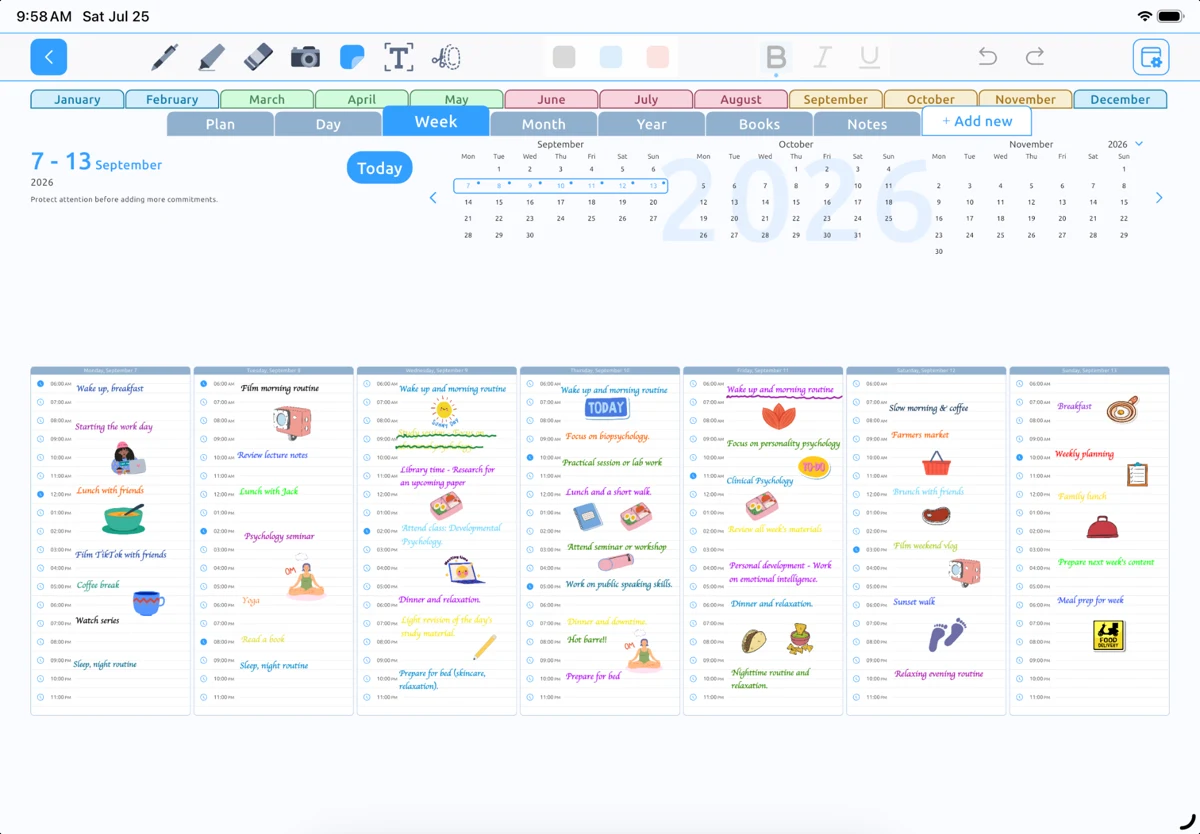
Plan around work, school, and everything else
If Google Calendar holds your commitments, a separate handwritten planner can mean copying the same schedule twice. Digital Planner supports Google Calendar integration as part of its iPad planning experience.
Look at the commitments that shape your week, then use handwriting for priorities, preparation, and the details you want to keep close.
Set up the integration for your account
Use the calendar integration options available in your version of Digital Planner and allow the access needed for your chosen account and calendars.
Account configuration and calendar permissions can affect availability. If you use a managed work or school account, your organization may also limit access. Contact support if you are unsure which setup applies to you.
Ask for help with Google CalendarTurn a full calendar into a realistic week
Start by identifying the busiest days. Put demanding work where you have actual space, and leave time for preparation and transitions. A weekly planner helps you consider the whole week instead of treating each day in isolation.
Use a daily page when you want to focus more closely on one day. Your notes can stay informal even when your calendar is structured.
Build a simple weekly planning habitKnow what is a note and what is an event
A handwritten time or appointment on a planning page does not necessarily create a Google Calendar event. Use the supported calendar features when you need an item to live in your calendar.
Keep the relevant calendar access enabled and your account connected. If events do not appear as expected, review the integration settings or ask our support team for help.
Can I use Google Calendar and Apple Pencil planning together?
Yes. Digital Planner supports Google Calendar integration and Apple Pencil handwriting in its iPad planning experience.
Will every Google calendar or account work the same way?
Calendar availability can vary with account permissions and configuration, particularly for managed work or school accounts. Contact support for help with your setup.
Make room for
a better-planned day.
Your handwriting. Your schedule. Your way.
Download on theApp StoreFor iPad · Designed for Apple Pencil