Digital Planner
for iPad.
Your day, in your own handwriting.
The feel of a paper planner. The possibilities of an app. Bring your plans, calendars, and reminders together — with room to make it yours.
Daily, weekly & monthly planning · Apple Pencil ready
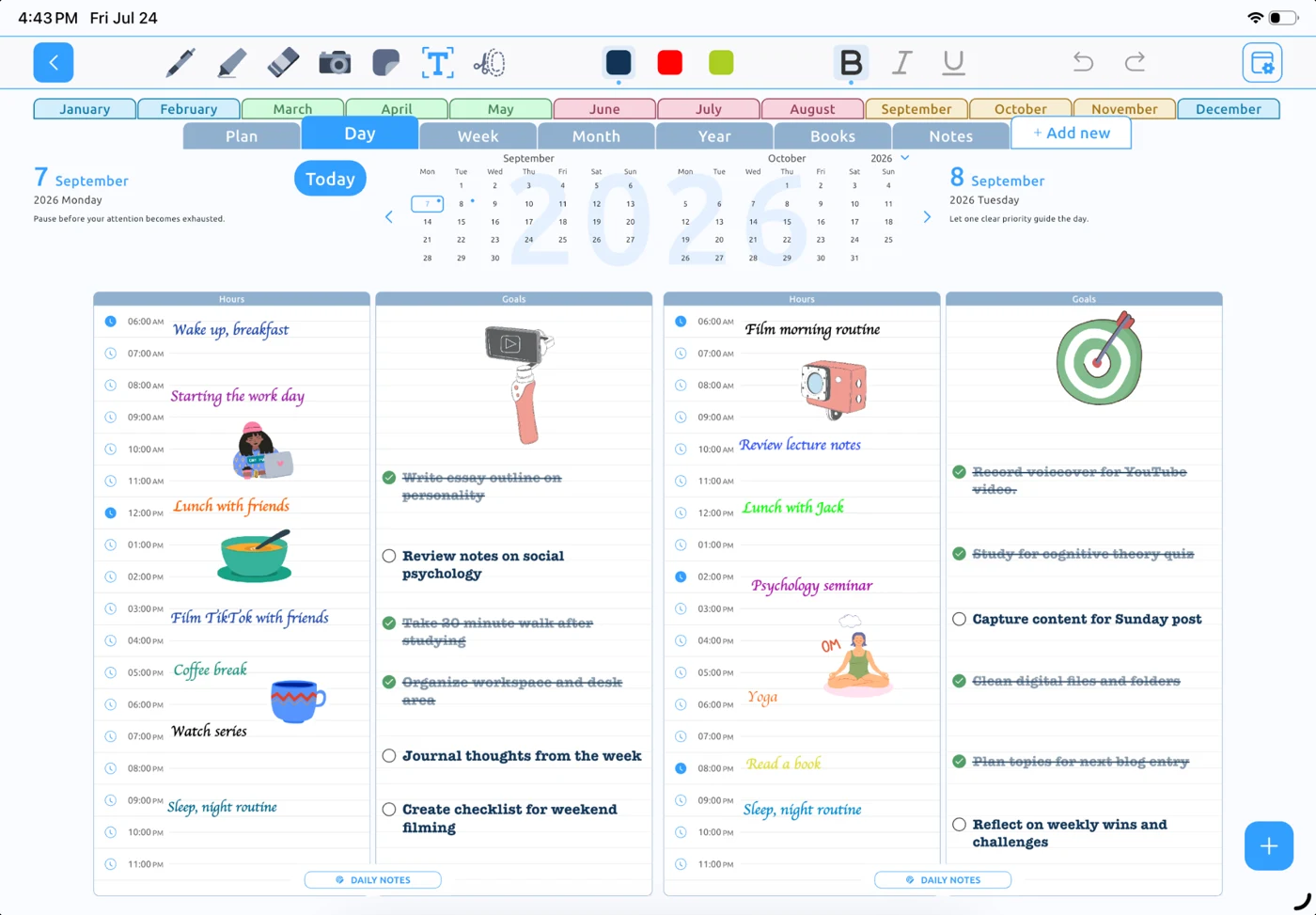
Finally, in the same place.
A little structure.
A lot of possibility.
Digital Planner is a standalone iPad app that combines handwritten planning with the tools your day already depends on.
A closer look at your day, week, or month.
Plan at the pace
of your life.
Some days need a detailed plan. Others need a little space. Move between daily, weekly, and monthly planning as your priorities change.
Make today feel doable.
Give your appointments, to-dos, and thoughts a place.
Find your weekly rhythm.
Look ahead and leave room for what matters.
See the month unfold.
Keep the bigger picture close while you plan the details.
Make the planner
fit your day.
See the settings behind the page. Choose how your schedule looks and keep the planning tools you use close at hand.
- Your time. Your week.
- Choose a 12- or 24-hour clock and start your week on Monday or Sunday.
- Room for your routine.
- Set your day’s start and end times, then adjust schedule width and goal row spacing.
- The connections you use.
- Find calendar and reminder options alongside the rest of your planner settings.
Your plans don’t
live in a bubble.
Connect your calendar and reminders to bring real-life commitments into your planner.
Explore calendar planning
Apple Calendar
Keep your schedule in view.
Apple Reminders
Give your to-dos a place.
Google Calendar
Bring work and life together.

Microsoft Outlook
Make space around your meetings.
What is Digital Planner for iPad?
Digital Planner for iPad is a standalone planning app for iPad and Apple Pencil. It brings daily, weekly, and monthly planning together with handwriting, calendars, and Apple Reminders.
Is this a PDF planner?
No. Digital Planner is a dedicated app, so you do not need to download a planner PDF or import it into a separate note-taking app. You can write by hand while using connected calendar and reminder features.
Can I use it with Apple Pencil?
Yes. You can use a compatible Apple Pencil to write, draw, and annotate your plans on iPad. Check Apple’s compatibility information for your iPad and Apple Pencil model.
Does it work with Apple Calendar, Google Calendar, and Outlook?
Yes. Digital Planner supports Apple Calendar, Google Calendar, and Microsoft Outlook. Calendar access depends on your device permissions and calendar account setup. See our calendar pages for details.
Does it work with Apple Reminders?
Yes. Digital Planner integrates with Apple Reminders, so your task lists can be part of your planning routine. Reminders access requires permission on your device.
Where can I find pricing and device requirements?
The App Store listing has current pricing, in-app purchase options, compatibility requirements, and release notes. Check the listing before downloading or purchasing.
Make room for
a better-planned day.
Your handwriting. Your schedule. Your way.
Download on theApp StoreFor iPad · Designed for Apple Pencil